TTL callback for Expired keys: Redis, Spring boot
Created on: Aug 5, 2024
This blog explains how to run Apache Kafka using Confluent. Below is a sample docker compose file to run 3 Kafka brokers and 1 ZooKeeper inside a single cluster.
package com.javatechie.redis; import com.javatechie.redis.entity.Product; import com.javatechie.redis.entity.Session; import com.javatechie.redis.respository.ProductDao; import com.javatechie.redis.respository.SessionDao; import org.springframework.beans.factory.annotation.Autowired; import org.springframework.boot.CommandLineRunner; import org.springframework.boot.SpringApplication; import org.springframework.boot.autoconfigure.SpringBootApplication; import org.springframework.cache.annotation.CacheEvict; import org.springframework.cache.annotation.CachePut; import org.springframework.cache.annotation.Cacheable; import org.springframework.cache.annotation.EnableCaching; import org.springframework.data.redis.core.RedisTemplate; import org.springframework.web.bind.annotation.*; import java.util.List; @SpringBootApplication @RestController @RequestMapping("/product") @EnableCaching public class SpringDataRedisExampleApplication implements CommandLineRunner { @Autowired private ProductDao dao; @PostMapping public Product save(@RequestBody Product product) { return dao.save(product); } @GetMapping public List<Product> getAllProducts() { return dao.findAll(); } @GetMapping("/{id}") @Cacheable(key = "#id", value = "Product", unless = "#result.price > 50000") public Product findProduct(@PathVariable int id) { return dao.findProductById(id); } @PutMapping("/{id}") @CachePut(value = "Product", key = "#id") public Product updateProduct(@PathVariable int id, @RequestBody Product updatedProduct) { Product res = dao.updateProduct(updatedProduct); return res; } @DeleteMapping("/{id}") @CacheEvict(key = "#id", value = "Product") public String remove(@PathVariable int id) { return dao.deleteProduct(id); } public static void main(String[] args) { SpringApplication.run(SpringDataRedisExampleApplication.class, args); } @Autowired private RedisTemplate redisTemplate; @Autowired private SessionDao sessionDao; @Override public void run(String... args) throws Exception { Session session = new Session(); session.setSomeValue("some value"); session.setId("123"); sessionDao.save(session); } }
Time to live is a concept where data get expired after specified time. This is useful to invalidate cache, session management, token. This can be implemented in redis, Couchbase, Elasticsearch.
Redis provides various event for comment event type like setting, deleting, epiry of keys. Application server can receive these events using pub sub of redis.
In redis, event corresponding to pattern keyevent@*:expired can be used to listen the expired key event and apply business logic.
Let’s take a example of real world scenario. In a e commerce platform, discount offer get expires at a particular time say 12 pm on some particular day and after that price of product will change. In this case, we can set a ttl key with some value that will expired at 12pm. After this time, we can reset the price after listening the key expired event.
Let’s look into sample code in spring boot application. Firstly set up local redis. docker installation is a easy way to quickly start.
\
docker run -d --name redis-stack-server -p 6379:6379 redis/redis-stack-server:latest
In spring boot application, We need a expired key listener class.
@Component @Slf4j public class KeyListener implements MessageListener { @Override public void onMessage(Message message, byte[] pattern) { String expiredKey = message.toString(); log.info("expired ket {}", expiredKey); } }
In redis configuration we need to register this bean to listen all the expired event keys. We have to do all this during application start.
\
@Configuration @EnableRedisRepositories(enableKeyspaceEvents = RedisKeyValueAdapter.EnableKeyspaceEvents.ON_STARTUP) public class RedisConfig { @Bean RedisMessageListenerContainer container(RedisConnectionFactory connectionFactory, MessageListenerAdapter listenerAdapter) { RedisMessageListenerContainer container = new RedisMessageListenerContainer(); container.setConnectionFactory(connectionFactory); container.addMessageListener(listenerAdapter, new PatternTopic("__keyevent@*__:expired")); return container; } @Bean MessageListenerAdapter listenerAdapter(MessageListener listener) { return new MessageListenerAdapter(listener); } @Bean public RedisTemplate<String, Object> redisTemplate(RedisConnectionFactory connectionFactory) { RedisTemplate<String, Object> template = new RedisTemplate<>(); template.setConnectionFactory(connectionFactory); RedisSerializer<String> stringSerializer = new StringRedisSerializer(); RedisSerializer<Object> jsonSerializer = new GenericJackson2JsonRedisSerializer(); template.setKeySerializer(stringSerializer); template.setValueSerializer(jsonSerializer); template.setHashKeySerializer(stringSerializer); template.setHashValueSerializer(jsonSerializer); template.afterPropertiesSet(); return template; } }
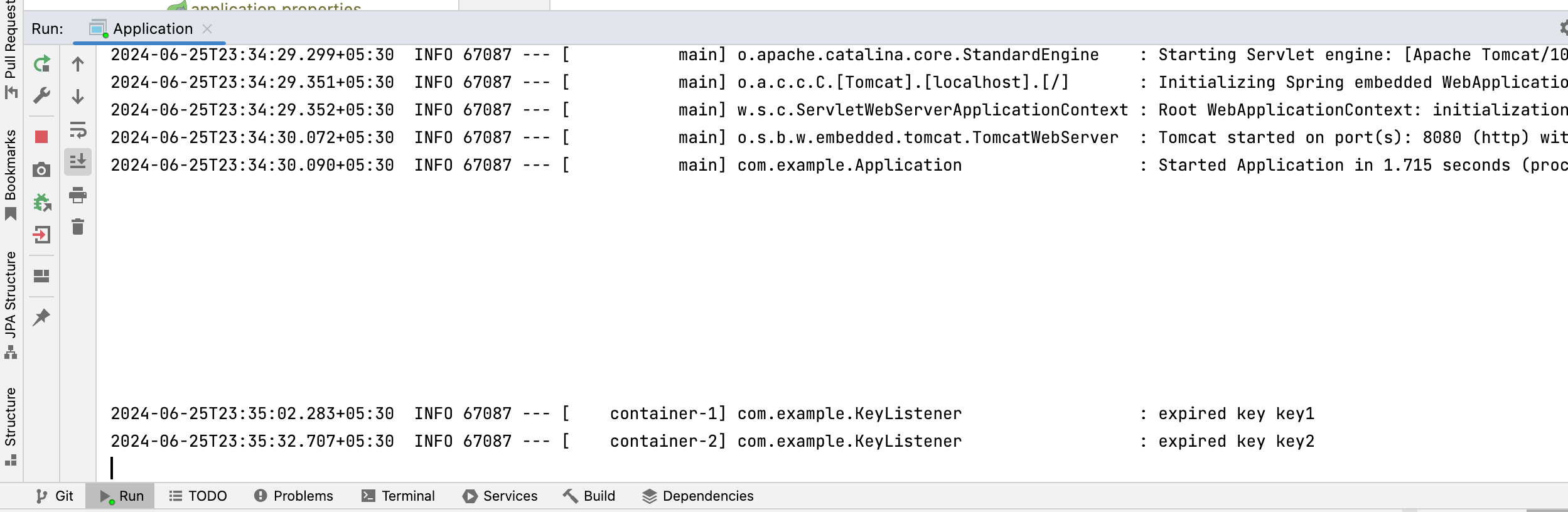
You can find full code in my github page. After running redis and application you can enter into redis terminal and set some ttl key value.
# enter into redis redis-cli -h 127.0.0.1 -p 6379 # set key value for 60 second SET key1 value1 EX 30 SET key2 value2 EX 60
Screenshot of expired keys logged in spring boot application